
Profile Menu
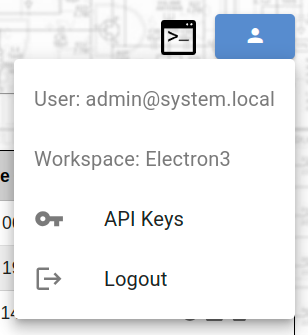
The Profile Menu provides account management and API configuration. Access it by clicking the profile button  in the top right corner.
profile-menu.png
Profile menu dropdown
Menu Items
| Item | Description |
|---|---|
| User | Current user email |
| Workspace | Current workspace name |
 API Keys API Keys | Manage API keys for integrations |
| Language | Change the interface language |
 Logout Logout | Sign out of LoomCAD |
API Keys
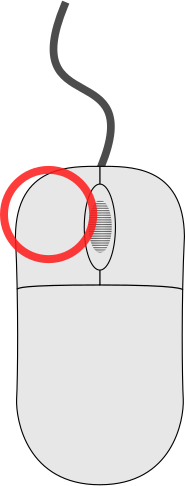 click API Keys
to configure external service integrations:
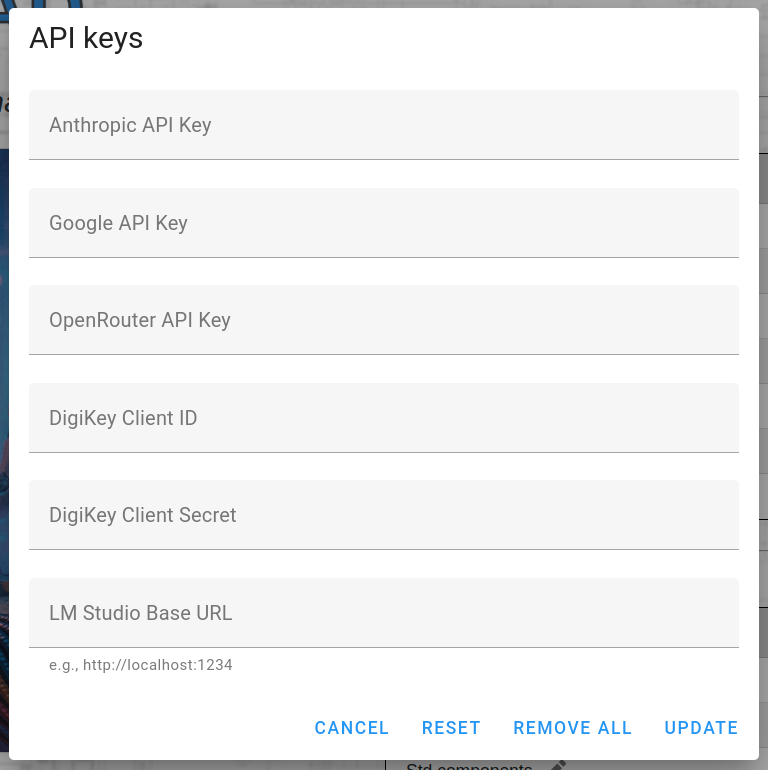
api-keys-dialog.png
API Keys configuration dialog
Available Keys
| Field | Description |
|---|---|
| Anthropic API Key | For Claude AI integration |
| Google API Key | For Google services |
| OpenRouter API Key | For OpenRouter API access |
| DigiKey Client ID | DigiKey API client identifier |
| DigiKey Client Secret | DigiKey API secret |
| LM Studio Base URL | Local LLM server URL (e.g., http://localhost:1234) |
Actions
| Button | Description |
|---|---|
| CANCEL | Close without saving |
| RESET | Reset to previous values |
| REMOVE ALL | Clear all API keys |
| UPDATE | Save changes |
Language
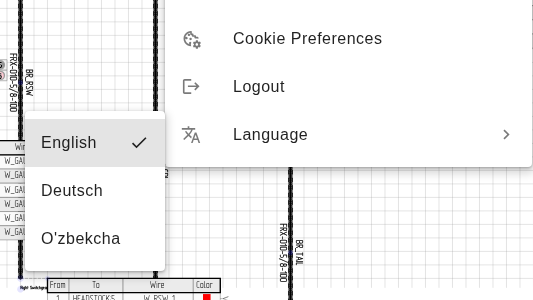
click Language to choose the interface language. A submenulists the available languages, with a checkmark on the current one.
profile-menu-language.png
Language submenu expanded, current language has a checkmark.
Selecting a language saves your choice and reloads the application in that language. The reload is expected. Your choice is remembered on this device for future sessions.
TIP
Any text that is not yet translated falls back to English, so parts of the interface may remain in English in some languages.
Related Topics
- Toolbar — toolbar with profile button
- Start Screen — project selection screen