
Command Reference
This page documents all script commands available in LoomCAD.
Command Syntax
All commands follow this pattern:
Script.commandName({ options });- Options are passed as an object
- Most commands have required and optional parameters
- Query commands return data directly:
{ success: boolean, elements: [...] } - All other commands (draw, update, erase, move) are asynchronous and do not return usable data
Execution Model
Draw, update, erase, and move commands are asynchronous — they are queued and executed in order, with changes applied after the script completes. You do not need to check their return values — errors are reported automatically.
Query commands are synchronous — they return data immediately.
Draw Commands
Create new elements on the canvas.
drawComponent
Creates a component (connector, terminal, device).
Script.drawComponent({
  position: { x: 200, y: 300 }, // Required: Position on canvas
  pinNumberingOrder: "column", // Required: 'column' or 'row'
  flipped: false, // Required: Flip orientation
  compElementData: {
    // Required: Component metadata
    name: "J101", // Required: Component name
    partnumber: "MOLEX-123", // Required: Part number
    pinCount: 8, // Required: Number of pins
  },
  pinData: {
    // Required: Pin configuration
    x: 1, // Horizontal pin count
    y: 8, // Vertical pin count
    pins: [
      // Required: Array of pin definitions
      { name: "1", partnumber: "" },
      { name: "2", partnumber: "" },
      // ... one entry for each pin
    ],
  },
});
Simplified example (minimum required):
// Create 8-pin connector with auto-generated pin names
const pins = [];
for (let i = 1; i <= 8; i++) {
  pins.push({ name: String(i), partnumber: "" });
}

Script.drawComponent({
  position: { x: 200, y: 300 },
  pinNumberingOrder: "column",
  flipped: false,
  compElementData: {
    name: "J101",
    partnumber: "MOLEX-123",
    pinCount: 8,
  },
  pinData: { x: 1, y: 8, pins },
});
drawLibraryComponent
Creates a component from a library.
Script.drawLibraryComponent({
  libraryId: "lib-123", // Library component ID
  name: "ECU1", // Name for the new instance
  x: 200,
  y: 300,
  flipped: false, // Optional: Place mirrored horizontally (default false)
});
flipped is passed explicitly and does not depend on the sidebar Flip component checkbox — scripts produce deterministic results regardless of the current UI state.
createLibraryComponent
Creates a new component in a library project. A new sheet is added to the library and the component is drawn on it.
Script.createLibraryComponent({
  libraryProject: libraryProject, // Required: Library project object
  pinData: {
    // Required: Pin layout
    x: 1, // Horizontal pin count
    y: 8, // Vertical pin count
    pins: [
      { name: "1", partnumber: "" },
      // ... one entry per pin
    ],
  },
  compElementData: {
    // Required: Component properties
    name: "J1",
    partnumber: "MOLEX-123",
    pinCount: 8,
  },
  flipped: false, // Required: Orientation
  pinNumberingOrder: "column", // Required: 'column' or 'row'
  position: { x: 200, y: 300 }, // Required: Position on sheet
  usePartNumber: true, // Optional: Use partnumber as sheet name
  sheetName: "NewComponent", // Optional: Fallback sheet name
  sideViewData: null, // Optional: Sideview image/SVG data
});
When usePartNumber is true, the library sheet is named after the component's part number. Otherwise the sheetName value is used (defaults to "NewComponent").
drawWire
Creates a wire connection between pins.
Script.drawWire({
  start: {
    // Required: Source pin
    componentName: "ECU1", // Component name
    pinName: "1", // Pin name (string)
  },
  end: {
    // Required: Destination pin
    componentName: "J101",
    pinName: "3",
  },
  name: "PWR_MAIN", // Required: Wire name
  partnumber: "WIRE-18AWG-RED", // Required: Part number
  colors: ["red"], // Optional: DIN 47100 color(s)
  coreSizeAWG: "18", // Optional: Wire gauge
});
Alternative: Pin by index (1-based):
Script.drawWire({
  start: { componentName: "ECU1", pinIndex: 1 }, // First pin
  end: { componentName: "J101", pinIndex: 3 }, // Third pin
  name: "PWR_MAIN",
  partnumber: "WIRE-18AWG-RED",
});
Color values: white, brown, green, yellow, grey, pink, blue, red, black, violet, orange
Two-color (stripe): Use array ['red', 'blue'] for stripe combinations.
drawBundle
Creates a bundle segment between two points, optionally with bend points.
Script.drawBundle({
  start: { x: 100, y: 200 }, // Required: Start point
  end: { x: 300, y: 200 }, // Required: End point
  name: "MAIN_TRUNK", // Required: Bundle name
  partnumber: "BUNDLE-001", // Required: Part number
  bendPoints: [
    // Optional: intermediate bend points
    { x: 150, y: 250 },
    { x: 250, y: 250 },
  ],
});
Multi-segment bundles
Use the bendPoints parameter to create a bundle with multiple segments in one command. The bundle path goes: start → bend1 → bend2 → ... → end.
tubingType values (set via updateBundle):
heatshrink,coldshrink,sleevingbraidedsleeving,solid,wireloomconduit,pvccoated
Naming elements
All draw commands below accept an optional name parameter. Named elements can later be queried and updated using updateX commands (e.g. updateLine, updateTextcontainer).
drawLine
Creates a decorative line (not electrical).
Script.drawLine({
  start: { x: 100, y: 100 },
  end: { x: 300, y: 100 },
  name: "BORDER_LINE",
  style: {
    strokeWidth: 2,
    strokeColor: "#000000",
    dashArray: [10, 5], // Optional: dashed line
  },
});
drawCircle
Creates a circle shape.
Script.drawCircle({
  center: { x: 200, y: 200 },
  radius: 50,
  name: "MARKER_CIRCLE",
  style: {
    strokeWidth: 1,
    strokeColor: "#000000",
    fillColor: "#ffffff",
  },
});
drawRectangle
Creates a rectangle shape.
Script.drawRectangle({
  start: { x: 100, y: 100 },
  end: { x: 300, y: 250 },
  name: "FRAME_RECT",
  style: {
    strokeWidth: 1,
    strokeColor: "#000000",
    fillColor: "#f0f0f0",
  },
});
drawText
Creates a text annotation.
Script.drawText({
  position: { x: 100, y: 50 },
  text: "Power Distribution",
  name: "TITLE_TEXT",
  fontSize: 14,
  style: {
    color: "#000000",
    fontFamily: "Arial",
    fontWeight: "bold",
    isItalic: false,
  },
});
drawDimension
Creates a dimension annotation.
Script.drawDimension({
  start: { x: 100, y: 200 },
  end: { x: 400, y: 200 },
  name: "MAIN_DIM",
  leadSize: -120,
});
drawImage
Places an image on the canvas.
Script.drawImage({
  src: "data:image/png;base64,...", // Image data or URL
  x: 100,
  y: 100,
  width: 200, // Optional
  height: 150, // Optional
});
drawBundleBreak
Adds a break point to a bundle.
Script.drawBundleBreak({
  bundleName: "MAIN_TRUNK",
  offset: 0.5, // Position along bundle (0.0 = start, 1.0 = end)
});
addBundleBend
Adds a bend (corner) to a bundle, splitting it into two segments.
Script.addBundleBend({
  bundleName: "MAIN_TRUNK",
  point: { x: 250, y: 200 }, // Point ON the bundle line
});
Calculating the point: The point must lie on the bundle segment:
point.x = start.x + k * (end.x - start.x)
point.y = start.y + k * (end.y - start.y)
where k is between 0 and 1 (e.g., 0.5 = midpoint). The point is projected onto the segment and clamped to the 5%–95% range.
removeBundleBend
Removes a bend from a bundle, merging two adjacent segments back into one.
Script.removeBundleBend({
  anchorID: "bend-anchor-id", // ID of the nonMergeable bend anchor
});
The anchor must be a bend anchor (nonMergeable: true). Both adjacent segments must belong to the same logical bundle. Any breaks on the merged segments are removed automatically.
addPins
Adds pins to an existing component. The component's pin count and pinout grid are updated automatically.
Script.addPins({
  query: "CONNECTOR_1", // Component name, or { name: "..." } or { id: "..." }
  pins: [
    { name: "5", partnumber: "PIN-001", gender: "Male", joinType: "crimp" },
    { name: "6", partnumber: "PIN-001", gender: "Male", joinType: "crimp" },
  ],
});
Each pin object requires name and partnumber. Optional properties:
| Property | Type | Description |
|---|---|---|
gender | string | "Male", "Female", or "NA" |
joinType | string | "crimp", "solder", "screw", or "IDC" |
maxAWG | number | Maximum (thickest) AWG accepted |
minAWG | number | Minimum (thinnest) AWG accepted |
maxWireSize | string | Maximum wire cross-section |
minWireSize | string | Minimum wire cross-section |
contactSize | number | Contact size |
maximumCurrentPerPin | string | Current rating per pin |
contactResistance | string | Contact resistance |
contactFinish | string | Contact finish (e.g., "Gold") |
contactMaterial | string | Contact material |
insulationDiameter | string | Insulation diameter |
manufacturer | string | Manufacturer name |
manufacturerPN | string | Manufacturer part number |
description | string | Pin description |
TIP
Use addPins instead of updateComponent when you need to add new pins. Updating the pins array directly only changes ID references without creating actual pin entities.
removePins
Removes pins from an existing component. Connected wires are automatically deleted. At least one pin must remain on the component.
Script.removePins({
  query: "CONNECTOR_1",
  pins: [
    { pinName: "5" }, // Remove by name
    { pinIndex: 6 }, // Remove by 1-based index
  ],
});
Each entry in the pins array identifies a pin by either pinName or pinIndex (1-based). Connected wires are automatically removed.
WARNING
Removing a pin also deletes all wires connected to it. Make sure this is intended before running the command.
Style Reference
Drawing and update commands use nested style objects for visual properties.
Shape Style (Line, Circle, Rectangle)
Used by: drawLine, drawCircle, drawRectangle, updateLine, updateCircle, updateRectangle
| Property | Type | Description |
|---|---|---|
strokeWidth | number | Border/line thickness |
strokeColor | string or [r,g,b] | Border/line color |
fillColor | string or [r,g,b] | Fill color |
dashArray | number[] | Dash pattern, e.g., [10, 5] |
Text Style (TextContainer)
Used by: drawText, updateTextcontainer
| Property | Type | Description |
|---|---|---|
color | string or [r,g,b] | Text fill color |
fontFamily | string | Font name (e.g., "Arial") |
fontWeight | string | "normal", "bold", "lighter" |
isItalic | boolean | Italic text (default: false) |
strokeColor | string or [r,g,b] | Text outline color |
strokeWidth | number | Text outline thickness |
Table Text Style (Pinout, CompWireTable)
Used by: updatePinout, updateCompwiretable
| Property | Type | Description |
|---|---|---|
fontSize | number | Font size |
fontFamily | string | Font name (e.g., "Arial") |
fontWeight | string | "normal", "bold" |
Table textStyle Limitations
Table textStyle does NOT support isItalic or color - only fontSize, fontFamily, and fontWeight.
Color Formats
Colors can be specified as:
- Hex strings:
"#FF0000","#f00","red" - RGB arrays:
[255, 0, 0](values 0-255)
Query Commands
Find and retrieve element data. Queries use exact name matching (case-sensitive).
Most query commands accept query as a string (name shorthand), or an object with one of: id, name, componentId, or componentName.
For child elements (queryPinout, querySideview, queryCompwiretable), the query refers to the parent component — use componentName or componentId to find elements belonging to a specific component.
No Wildcards
Queries use exact matching only. You cannot use patterns like J* or PWR*. Instead, query all elements and filter with JavaScript.
queryComponent
// By exact name
const result = Script.queryComponent({ query: "ECU1" });
if (result.success && result.elements.length > 0) {
  const comp = result.elements[0];
  scriptConsole.log(`Found: ${comp.name} with ${comp.pinCount} pins`);
}

// Get all components, then filter in JavaScript
const allComps = Script.queryComponent({});
const jConnectors = allComps.elements.filter(c => c.name.startsWith("J"));
scriptConsole.log(`Found ${jConnectors.length} J-series connectors`);

// By ID
const result = Script.queryComponent({
  query: { id: "comp-uuid-123" },
});
Returns: { success: boolean, elements: [...] } where elements have:
id,name,x,y,pinCount,partnumber,manufacturer, etc.
queryWire
// By exact name
const result = Script.queryWire({ query: "PWR_MAIN" });

// Get all wires, then filter by property in JavaScript
const allWires = Script.queryWire({});
const redWires = allWires.elements.filter(
  w => w.colors && w.colors.includes("red")
);
scriptConsole.log(`Found ${redWires.length} red wires`);
Returns: Array of wire objects with:
id,name,colors,coreSizeAWG,fromComponent,fromPin,toComponent,toPin, etc.
queryBundle
const result = Script.queryBundle({ query: "MAIN_TRUNK" });queryPin
Uses a special query format with componentName plus pinName or pinIndex.
// Query specific pin by name
const result = Script.queryPin({
  query: { componentName: "ECU1", pinName: "GND" },
});

// Query specific pin by index (1-based)
const result = Script.queryPin({
  query: { componentName: "ECU1", pinIndex: 3 },
});

// Query pin by ID
const result = Script.queryPin({
  query: { id: "pin-uuid-123" },
});
queryAnchor
Query anchors by ID only:
// Query specific anchor by ID
const result = Script.queryAnchor({
  query: { id: "anchor-uuid-string" },
});

// Get all anchors (no filter)
const allAnchors = Script.queryAnchor({});
ID-only queries
queryAnchor only supports querying by id. There is no bundle parameter. To find anchors on a specific bundle, query all anchors and filter in JavaScript.
querySideview
Queries by parent component name or ID, not by sideview name.
// By parent component name (string shorthand)
const result = Script.querySideview({ query: "J101" });

// By parent component name (object format)
const result = Script.querySideview({ query: { componentName: "J101" } });

// By parent component ID
const result = Script.querySideview({
  query: { componentId: "60d5ec49b4f4a73d4c8b4567" },
});
queryPinout
Queries by parent component name or ID, not by pinout name.
// By parent component name (string shorthand)
const result = Script.queryPinout({ query: "ECU1" });

// By parent component name (object format)
const result = Script.queryPinout({ query: { componentName: "ECU1" } });

// By parent component ID
const result = Script.queryPinout({
  query: { componentId: "60d5ec49b4f4a73d4c8b4567" },
});
Update Commands
Modify existing elements. Requires exact name or ID in the query parameter.
Update Syntax
Update commands use { query: '...', update: {...} } format. You must specify the exact element to update—wildcards are not supported.
updateComponent
Script.updateComponent({
  query: "ECU1", // Target by exact name
  update: {
    partnumber: "NEW-PART", // Properties to update
    manufacturer: "Bosch",
  },
});

// Update by ID
Script.updateComponent({
  query: { id: "comp-uuid-123" },
  update: { name: "ECU_RENAMED" },
});
updateWire
Script.updateWire({
  query: "PWR_MAIN", // Exact wire name
  update: {
    colors: ["red"],
    coreSizeAWG: "14",
  },
});

// To update multiple wires, query all then iterate
const allWires = Script.queryWire({});
allWires.elements.forEach(wire => {
  if (wire.name.startsWith("SIG")) {
    // JavaScript filtering
    Script.updateWire({
      query: wire.name,
      update: { coreSizeAWG: "22" },
    });
  }
});
updateBundle
Script.updateBundle({
  query: "MAIN_TRUNK",
  update: {
    tubingType: "conduit",
    coveringColor: "grey",
  },
});
updateAnchor
Script.updateAnchor({
  query: { id: "anchor-uuid" },
  update: {
    x: 350,
    y: 200,
  },
});
updatePin
// By component name and pin name
Script.updatePin({
  query: { componentName: "ECU1", pinName: "1" },
  update: {
    name: "VBAT",
  },
});

// By component name and pin index (1-based)
Script.updatePin({
  query: { componentName: "ECU1", pinIndex: 1 },
  update: {
    name: "VBAT",
  },
});
updateLine
Updates a line's geometry and style.
Script.updateLine({
  query: "BORDER_LINE",
  update: {
    coords: { x: 0, y: 0 },
    coordsEnd: { x: 100, y: 100 },
    style: {
      strokeWidth: 2,
      strokeColor: "#FF0000",
      dashArray: [10, 5],
    },
  },
});
updateCircle
Updates a circle's geometry and style.
Script.updateCircle({
  query: "MARKER_CIRCLE",
  update: {
    coords: { x: 250, y: 250 },
    radius: 75,
    style: {
      strokeWidth: 2,
      strokeColor: "#0000FF",
      fillColor: "#CCCCFF",
    },
  },
});
updateRectangle
Updates a rectangle's geometry and style.
Script.updateRectangle({
  query: "FRAME_RECT",
  update: {
    width: 200,
    length: 100,
    style: {
      strokeWidth: 1,
      strokeColor: "#000000",
      fillColor: "#FFFFCC",
    },
  },
});
updateTextcontainer
Updates a text element. Note: Uses style (not textStyle).
Script.updateTextcontainer({
  query: "TITLE_TEXT",
  update: {
    text: "Updated Label",
    fontSize: 16,
    style: {
      color: "#333333",
      fontFamily: "Arial",
      fontWeight: "bold",
      isItalic: true,
    },
  },
});
attachText
Attaches a text container to a bundle segment. The text's parent anchor becomes an offset anchor on the segment (slides along via position), and the perpendicular distance from the bundle line is stored on the text container itself.
textcontainer- identifies the text container. Exactly one of:id- text container IDname- text container nameanchorId- ID of the parent anchoranchorName- name of the parent anchor
bundle- identifies the bundle segment:id- bundle part IDname- bundle name
position- offset along the segment,0(start) to1(end)distance- perpendicular offset from the bundle line. Signed: positive = left of the segment direction in screen coords.
Script.attachText({
  textcontainer: { name: "TC_1" },
  bundle: { name: "MAIN_BUNDLE" },
  position: 0.5,
  distance: 20,
});
Default labels
Newly created bundles already get two labels ($REFDES and $PN) on the first segment. Use attachText to add more labels or to reattach a label to a different bundle.
updatePinout
Updates a component's pinout table appearance. The query refers to the parent component, not the pinout element itself.
// By parent component name (string shorthand)
Script.updatePinout({
  query: "J101",
  update: {
    colSizes: { x: 60, y: 25 },
    numColsRows: { x: 4, y: 2 },
    textStyle: {
      fontSize: 10,
      fontFamily: "Courier",
      fontWeight: "normal",
    },
  },
});

// By parent component name (object format)
Script.updatePinout({
  query: { componentName: "J101" },
  update: { colSizes: { x: 250, y: 50 } },
});
updateCompwiretable
Updates a component's wire table appearance. The query refers to the parent component, not the wire table element itself.
// By parent component name (string shorthand)
Script.updateCompwiretable({
  query: "J101",
  update: {
    colSizes: { x: 80, y: 20 },
    isFlip: false,
    textStyle: {
      fontSize: 12,
      fontFamily: "Arial",
      fontWeight: "bold",
    },
  },
});

// By parent component name (object format)
Script.updateCompwiretable({
  query: { componentName: "J101" },
  update: { colSizes: { x: 80, y: 20 } },
});
Move Commands
Reposition elements.
move
// Single element - absolute position
Script.move({
  queries: [{ type: "component", query: "J101" }],
  position: { x: 500, y: 300 },
});

// Single element - relative movement
Script.move({
  queries: [{ type: "component", query: "J101" }],
  position: { dx: 100, dy: -50 }, // Move 100 right, 50 up
});

// Multiple elements - MUST use relative position
Script.move({
  queries: [
    { type: "component", query: "J101" },
    { type: "component", query: "J102" },
    { type: "wire", query: "PWR_MAIN" },
  ],
  position: { dx: 100, dy: 0 }, // Relative required for multiple
});
Query types: component, wire, bundle, anchor, sideview, pinout
Multiple elements
When moving multiple elements, you MUST use relative position (dx, dy). Absolute position (x, y) only works for a single element.
Erase Commands
Delete elements.
eraseComponent
Script.eraseComponent({ query: "J101" });

// By ID
Script.eraseComponent({ query: { id: "comp-uuid" } });
eraseWire
Script.eraseWire({ query: "PWR_MAIN" });eraseBundle
Script.eraseBundle({ query: "MAIN_TRUNK" });eraseDimension, eraseTextcontainer, eraseImage
Script.eraseDimension({ query: { id: "dim-uuid" } });
Script.eraseTextcontainer({ query: { id: "text-uuid" } });
Script.eraseImage({ query: { id: "img-uuid" } });
Utility Commands
copyWire
Duplicates wire configuration from one pin to another.
Script.copyWire({
  from: { componentName: "ECU1", pinName: "1" },
  to: { componentName: "ECU1", pinName: "2" },
});
mergeAnchors
Combines multiple anchor points into one.
Script.mergeAnchors({
  anchors: ["anchor-1", "anchor-2", "anchor-3"],
  target: { x: 300, y: 200 }, // Position for merged anchor
});
makeSideview
Creates a sideview (connector shell image) for a component. Four modes are supported - use exactly one per call.
Mode 1 - From existing image on canvas:
Script.makeSideview({
  image: { type: "image", query: { id: "image-id" } },
  component: { query: "J101" },
});
Merges anchors and converts the image into a sideview.
Mode 2 - From component's own image data:
Script.makeSideview({
  component: { query: "J101" },
  useComponentImageData: true,
  autoScale: true,
});
Uses the component's imageData and imageType properties (e.g. populated from DigiKey). No pre-drawn image needed.
Mode 3 - From explicit image data:
Script.makeSideview({
  component: { query: "J101" },
  pathData: "data:image/png;base64,...",
  pathDataType: "png",
  scale: { x: 2.0, y: 2.0 },
  coords: { x: -200, y: 0 },
});
Mode 4 - From DigiKey search history:
await Script.fetchDigikeyObject({ partNumber: "NZ02205C0000G" });

Script.makeSideview({
  component: { query: "J1" },
  digikeyPartNumber: "NZ02205C0000G",
  coords: { x: 0, y: -150 },
});
Resolves the cached DigiKey product image (populated by fetchDigikeyObject or the DigiKey dialog) and attaches it as a sideview to an existing component. Defaults transparentColor to "#FFFFFF" (tolerance 20) and uses the cached image scale, matching the behavior of drawComponent's sideViewData.digikeyPartNumber shortcut. Both can be overridden by explicit options.
Adding a DigiKey sideview to an already-placed component
If you placed a connector by hand (or by an earlier script) and only later decided to attach the DigiKey product image, use Mode 4 instead of recreating the component with drawComponent. The component, its pins, and any wires already attached to it stay untouched.
Fails if no DigiKey history entry exists for the part, or if the cached entry has no image (re-run fetchDigikeyObject with fetchImage: true).
Common options (Modes 2, 3 & 4):
| Option | Type | Description |
|---|---|---|
autoScale | boolean | Auto-calculate scale to fit ~150px sideview size |
scale | object | { x, y } scale factors (default {1,1}; overrides autoScale) |
coords | object | { x, y } offset from component anchor (default {-200, 0}) |
transparentColor | string | Color to make transparent, e.g. "#ffffff" (Mode 4 default "#FFFFFF") |
transparentColorTolerance | number | Tolerance for transparent color matching (Mode 4 default 20) |
createRevision | boolean | Create revision entry (default true; set false in batch scripts) |
fetchDigikeyObject
Fetches DigiKey part data and product image. Results are cached in the session so drawComponent and makeSideview can use the image as a sideview via sideViewData.digikeyPartNumber / digikeyPartNumber. Fetched parts also appear in the DigiKey dialog history.
A DigiKey part is not always a Component. The same call serves all five manufactured object types - Component, Pin (Terminal), Bundle (heat shrink, sleeving), Wire (bulk reel), BundleSplice (boot, breakout). The returned summary carries one pre-mapped field bag per type, ready to feed into the matching update command.
Legacy name
fetchDigikeyComponent is the historical name and continues to work - same implementation. Prefer fetchDigikeyObject in new scripts; the name reflects that the part may map to any object type.
// Fetch by exact part number
const result = await Script.fetchDigikeyObject({
  partNumber: "LM358N",
});
// result: { success, component: { partnumber, manufacturer, ..., hasImage,
//   componentFields, terminalFields, bundleFields, wireFields, bundleSpliceFields } }

// Or search by keyword
const searchResult = await Script.fetchDigikeyObject({
  keyword: "opamp DIP-8",
  limit: 3,
});
// searchResult:
// { success, component: <first match>, components: [<all matches>] }| Parameter | Type | Description |
|---|---|---|
partNumber | string | Exact part number (detail lookup) |
keyword | string | Keyword search (returns multiple results) |
limit | number | Max results for keyword search (default: 5) |
fetchImage | boolean | Fetch the product image (default: true) |
At least one of partNumber or keyword is required.
Response shape:
result.componentis the single top match (always present on success).result.componentsis the full array of matches, set only for keyword search. ForpartNumberlookups it isundefined.result.component === result.components[0]whencomponentsis present.
Common mistake
The array of all matches lives at the top level (result.components), not nested under result.component. Reading result.component.components always yields undefined, which silently turns into an empty list and looks like "no results found" even when the search returned plenty.
Per-type field bags. Each match carries five pre-mapped bags. Spread the one that matches the LoomCAD object type you are enriching directly into the matching update command's update argument. Only defined fields are present, so a spread does not overwrite existing properties with undefined.
| Target object type | Bag | Use with |
|---|---|---|
| Component | componentFields | updateComponent / drawComponent compElementData |
| Pin (Terminal) | terminalFields | updatePin |
| Bundle | bundleFields | updateBundle |
| Wire | wireFields | updateWire |
| BundleSplice | bundleSpliceFields | updateBundleSplice |
bundleFields carries tubingType, coveringColor/coveringMaterial, insideDiameter/outsideDiameter/wallThickness, heatShrinkRatio / heatShrinkTemperature / heatShrinkSuppliedDiameter / heatShrinkRecoveredDiameter / heatShrinkRecoveredWallThickness, abrasionProtection, liquidProtection, environmentProtection, flammabilityRating, standards, minTemp/maxTemp, datasheetURL/productURL. Other bags follow the same pattern with the fields relevant to their type. datasheetURL and productURL are present in every bag, so spreading the bag always carries them onto the target object.
Common fields are NOT in the bags
partnumber, manufacturer, manufacturerPN, description are on result.component directly. Spread them separately before the bag.
Set BOTH partnumber AND manufacturerPN
Every manufactured object (Wire, Bundle, Component, Pin, BundleSplice) has two PN fields:
partnumber- mandatory, visible in the inspector as "PN".manufacturerPN- optional, hidden by default (debug-only flag).
When enriching from DigiKey, set both to dk.component.partnumber. Writing only manufacturerPN lands the value in a field the user does not normally see, so the change looks like a no-op even though the data was saved.
Bundle enrichment example:
const dk = await Script.fetchDigikeyObject({
  keyword: "FP-301 1/8 RD 500",
  limit: 5,
});

if (!dk.success) {
  scriptConsole.critical("Search failed: " + dk.errors.join(", "));
} else {
  const matches = dk.components || [dk.component];
  const top = matches[0];

  Script.updateBundle({
    query: "BUNDLE01",
    update: {
      partnumber: top.partnumber, // ← visible PN
      manufacturerPN: top.partnumber, // ← hidden mfg-PN, kept consistent
      manufacturer: top.manufacturer,
      description: top.description,
      ...top.bundleFields, // ← all bundle-relevant DigiKey properties
    },
  });
}
Wire enrichment by exact part number:
const dk = await Script.fetchDigikeyObject({ partNumber: "64165" });
if (dk.success) {
  Script.updateWire({
    query: "W1",
    update: {
      partnumber: dk.component.partnumber,
      manufacturerPN: dk.component.partnumber,
      manufacturer: dk.component.manufacturer,
      description: dk.component.description,
      ...dk.component.wireFields, // ← wireType, overallDiameter, colors, etc.
    },
  });
}
Using the cached image with drawComponent:
const dk = await Script.fetchDigikeyObject({ partNumber: "LM358N" });
const comp = dk.component;

Script.drawComponent({
  position: { x: 0, y: 0 },
  flipped: false,
  pinNumberingOrder: "column",
  compElementData: {
    name: "U1",
    partnumber: comp.partnumber,
    manufacturer: comp.manufacturer,
    manufacturerPN: comp.partnumber,
    description: comp.description,
    pinCount: 8,
    ...comp.componentFields, // ← shellMaterial, connectorStyle, ratedVoltage, etc.
  },
  pinData: {
    x: 1,
    y: 8,
    pins: [
      { name: "OUT_A", partnumber: "1" },
      { name: "IN-_A", partnumber: "2" },
      // ... all pins
    ],
  },
  sideViewData: {
    digikeyPartNumber: "LM358N", // Resolves image from cache
    coords: { x: 0, y: -150 },
  },
});
When digikeyPartNumber is set in sideViewData, drawComponent looks up the cached DigiKey image data and populates pathData, pathDataType, scale, and transparentColor automatically.
To attach the cached DigiKey image to a component that is already on the sheet (not being created right now), use makeSideview Mode 4 with the same digikeyPartNumber parameter instead.
queryDigikeySearchHistory
Returns cached component metadata for a previously fetched part number. This is a synchronous command - the result is available immediately. The returned data does not include image blobs; use sideViewData.digikeyPartNumber for the image.
const dk = Script.queryDigikeySearchHistory({ partNumber: "LM358N" });
const comp = dk.component;
// comp.partnumber, comp.manufacturer, comp.pinCount, comp.parameters, comp.hasImage, ...| Parameter | Type | Description |
|---|---|---|
partNumber | string | Part number to look up in cache |
convertToSideview
Converts an image into a sideview.
Script.convertToSideview({
  type: "image",
  query: { id: "image-element-id" },
});
rehangWire
Reconnects a wire to a different pin.
Script.rehangWire({
  wire: "PWR_MAIN",
  endpoint: "from", // 'from' or 'to'
  newPin: { componentName: "ECU2", pinName: "1" },
});
calculateFanouts
Populates the three derived pin dimensions - fanLength, stripLength, addonLength - on a component (or every component) from its pin geometry. The values feed the Wire Cut List on the Manufacturing Data dialog.
// All components, default lengths
Script.calculateFanouts({});

// One named component with custom pin pitch
Script.calculateFanouts({
  query: "J2",
  pinPitch: 3.5,
});
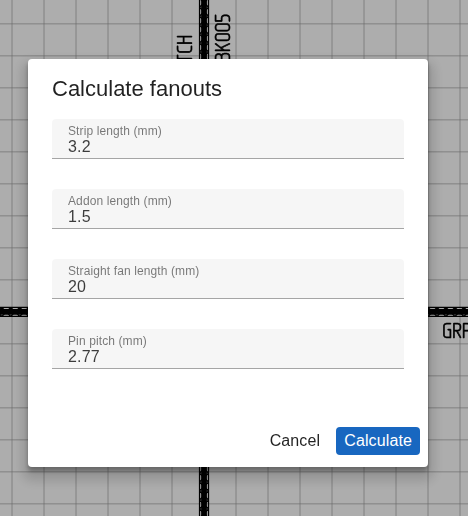
The same command is reachable from the menu as Calculate fanouts; the parameter dialog exposes the four numeric inputs below for non-scripters.
| Parameter | Type | Default | Description |
|---|---|---|---|
query | string | object | - | Component query ("J2" or { name } / { id }); omit for all |
stripLength | number (mm) | 3.2 | Bare-conductor length at the pin end |
addonLength | number (mm) | 1.5 | Length consumed by the contact / termination beyond the strip |
straightFanLength | number (mm) | 20 | Base fan length for centre pins |
pinPitch | number (mm) | 2.77 | Distance between neighbouring pins |
stripLength and addonLength are written verbatim onto every pin. fanLength is computed per pin from its offset from the centre:
fanLength = sqrt(straightFanLength² + (offsetFromMiddle × pinPitch)²)So centre pins get the straight value and outer pins fan out diagonally, proportionally longer with distance from the middle.
TIP
Use this once after a connector's pin geometry settles. Wire cut lengths in the Manufacturing Data dialog will then reflect the fanout contribution.
Revision Commands
Manage named revision checkpoints in the project history.
createRevision
Creates a named revision checkpoint. Named revisions appear bold in the undo/redo history menus, making them easy to find among regular operations.
Script.createRevision({
  name: "Before bulk wire update", // Required: human-readable label
});
Automatic Checkpoints
When you run a script from the Scripts tab or AI chat, LoomCAD automatically creates a named revision checkpoint before execution. This lets you easily revert the entire script's changes with a single undo step.
restoreRevision
Loads a previous revision by name or numeric index.
// Restore by name — finds the revision labeled "Before bulk wire update"
Script.restoreRevision({
  name: "Before bulk wire update",
});

// Restore by absolute index
Script.restoreRevision({
  index: 5,
});

// Restore by relative index — go back 3 steps from current
Script.restoreRevision({
  index: -3,
});
Parameters (one required):
| Parameter | Type | Description |
|---|---|---|
name | string | Find revision by its label, searching backward from current position |
index | number | Jump to revision number. Negative values are relative (e.g., -3 = go back 3) |
Backward Search
When searching by name, restoreRevision scans backward from the current revision. Calling it repeatedly with the same name walks back through all matching checkpoints one by one.
Script Output
Use scriptConsole (not console) for output:
scriptConsole.log("Information message");
scriptConsole.warning("Warning message");
scriptConsole.critical("Error message");
scriptConsole.table(data); // Display tabular data
Enums Reference
Wire Colors (DIN 47100)
Single colors: white, brown, green, yellow, grey, pink, blue, red, black, violet, orange
Two-color combinations (stripe): Use array format: ['white', 'green'], ['red', 'blue'], ['yellow', 'brown'], etc.
Tubing Types
heatshrink, coldshrink, sleeving, braidedsleeving, solid, wireloom, conduit, pvccoated
Wire Types
singlecore, multicore, twisted
Pin Numbering Order
column, row
Gender
male, female
Join Type
crimp, solder
Next Steps
- Scripting Basics - Get started with scripts
- Script Libraries - Save and reuse scripts
- Debugging Scripts - Troubleshoot errors