
Trust & Verification
AI-generated designs require human verification before manufacturing. This chapter establishes a Human-in-the-Loop (HITL) protocol for working safely with AI assistance.
Manufacturing Standards
AI output is a starting point, not a finished product. All designs must be verified against your company's quality standards before release to production.
The Trust Spectrum
Not all AI outputs require the same level of scrutiny:
| Output Type | Trust Level | Verification Required |
|---|---|---|
| Documentation questions | High | None - informational only |
| Design suggestions | Medium | Review for applicability |
| Generated scripts | Low | Review before running |
| Bulk modifications | Very Low | Verify each change |
Rule of thumb: The more elements affected, the more verification needed.
HITL Protocol: Three-Step Verification
Step 1: Review Before Running
When AI generates a script:
- Read the code - Understand what it will do
- Check quantities - Verify counts and ranges
- Confirm targets - Are the right elements affected?
Example: AI wants to update all wires to 18AWG
Before running, ask yourself: Do ALL wires really need to be 18AWG? What about power wires that need 14AWG?
Step 2: Verify After Running
After executing a script:
- Visual inspection - Does the design look correct?
- Spot check properties - Select random elements, verify values
- Run validation - Ask AI to check for issues
"Check for any wires with incorrect gauge for their current rating"
Step 3: Manufacturing Review
Before releasing to production:
- BOM verification - Cross-check part numbers with suppliers
- Wire list audit - Verify all connections match requirements
- Drawing review - Ensure annotations are accurate
- Sign-off - Document who verified what
High-Risk Operations
Be especially careful with these AI-assisted tasks:
Bulk Updates
When AI modifies multiple elements at once, be especially careful:
// CAUTION: This script updates ALL wires to 22AWG
const allWires = Script.queryWire({});
allWires.elements.forEach(wire => {
  Script.updateWire({
    query: wire.name,
    update: { coreSizeAWG: "22" },
  });
});
Safer approach: Query first, review the list, then target specific elements:
// Better: Only update signal wires (filter by name pattern)
const allWires = Script.queryWire({});
const signalWires = allWires.elements.filter(w => w.name.startsWith("SIG"));

// Review what will be changed
scriptConsole.log(`Will update ${signalWires.length} signal wires`);
scriptConsole.table(
  signalWires.map(w => ({ name: w.name, current: w.coreSizeAWG }))
);

// Only then update each one
signalWires.forEach(wire => {
  Script.updateWire({
    query: wire.name,
    update: { coreSizeAWG: "22" },
  });
});
Deletions
AI erasure commands are immediate:
// WARNING: No undo within script
Script.eraseComponent({ query: "J101" });
Mitigation:
- Save project before running erase scripts
- Use Ctrl+Z immediately if wrong elements deleted
- Ask AI to list what will be deleted before erasing
Auto-Generated Components
AI can create components from descriptions, but:
- Pin counts may be assumed incorrectly
- Part numbers should be verified against datasheets
- Electrical specifications need validation
Verification Checklists
Before Releasing BOM
| Check | Method |
|---|---|
| Part numbers exist | Search DigiKey/Mouser |
| Specifications match | Compare to datasheets |
| Quantities correct | Cross-reference design |
| Lead times acceptable | Check supplier availability |
Before Releasing Wire List
| Check | Method |
|---|---|
| Wire gauges appropriate | Calculate current capacity |
| Colors per spec | Verify against customer requirements |
| Lengths include service loops | Add margin for assembly |
| Terminal crimp specs correct | Match wire gauge to terminal |
Before Releasing Drawing
| Check | Method |
|---|---|
| All connections shown | Compare to wire list |
| Dimensions accurate | Verify scale and measurements |
| Labels readable | Check font sizes |
| Revision marked | Include date and author |
AI Confidence Indicators
When asking the AI about your design, notice hedging language:
| AI Says | Meaning | Action |
|---|---|---|
| "This will..." | High confidence | Verify anyway |
| "This should..." | Medium confidence | Definitely verify |
| "I think..." | Low confidence | Research independently |
| "I'm not sure..." | Very low confidence | Don't proceed without confirmation |
Audit Trail
Maintain records of AI-assisted design decisions:
What to Document
- Prompts used - What did you ask the AI?
- Scripts executed - Save generated code
- Verification performed - What did you check?
- Changes made - What did AI modify?
How to Document
Option 1: Chat history export
- Save chat transcripts for project records
Option 2: Script library
- Save verified scripts with descriptions
- Note what verification was performed
Option 3: Project comments
- Add notes to design elements about AI involvement
Recovery Procedures
If AI Made Wrong Changes
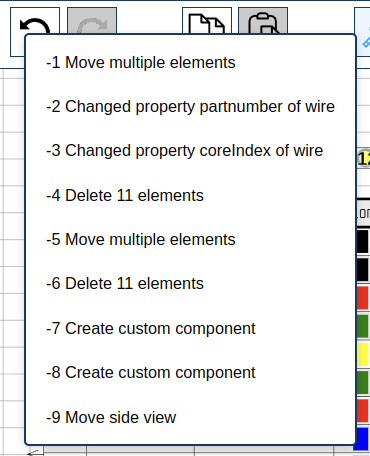
LoomCAD automatically creates a named revision checkpoint before every script execution. Named revisions appear bold in the undo/redo history menu.
- Immediate: Ctrl+Z to undo
- Script rollback:
 click the Undo button, find the bold checkpoint entry for the script run, and click it to revert all changes at once
 - Via script: Use
restoreRevisionto jump back to any named checkpoint - Older: Load from auto-save or export backup
If Design Data Corrupted
- Export current project as JSON (backup current state)
- Load previous known-good version
- Report issue to support with steps to reproduce
Best Practices Summary
DO
- Review scripts before running
- Verify bulk changes element-by-element
- Cross-check part numbers with suppliers
- Document AI-assisted decisions
- Use targeted queries instead of blanket updates
DON'T
- Run AI scripts on production data without backup
- Trust part number suggestions without verification
- Skip the verification step for "simple" changes
- Use AI-generated designs without human sign-off
Compliance Considerations
For regulated industries (automotive, aerospace, medical):
- AI-generated content may require additional documentation
- Maintain clear traceability between requirements and design
- Consider AI as a tool, not a decision-maker
- Establish company policies for AI-assisted design
Next Steps
- Prompt Recipes - Proven prompts that produce reliable results
- Scripting Basics - Understand what AI scripts do
- Debugging Scripts - Fix issues when scripts fail